您现在的位置是:网站首页> 编程资料编程资料
.Net Core中使用ExceptionFilter过滤器的方法_实用技巧_
 2023-05-24
365人已围观
2023-05-24
365人已围观
简介 .Net Core中使用ExceptionFilter过滤器的方法_实用技巧_
.Net Core中有各种Filter,分别是AuthorizationFilter、ResourceFilter、ExceptionFilter、ActionFilter、ResultFilter。可以把他们看作是.Net Core自带的AOP的扩展封装。
今天来看其中的一种:ExceptionFilter(用于全局的异常处理)
首先新建一个.Net Core MVC的项目
新建一个控制器:
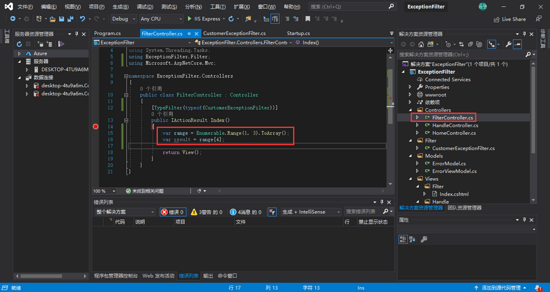
这里我们可以看到代码运行到16行时会报一个索引项超出集合范围的错误
按照常规的思维我们在代码中会加异常处理,如下:
try { var range = Enumerable.Range(1, 3).ToArray(); var result = range[4]; return View(); } catch (Exception ex) { throw new Exception(ex.Message); }但是每个方法都这样加会不会觉得很烦?有没有想过只写一次就可以了
上代码:
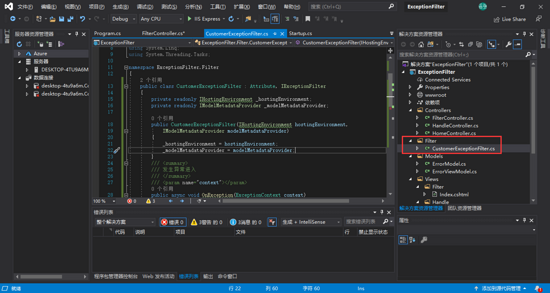
using Microsoft.AspNetCore.Hosting; using Microsoft.AspNetCore.Mvc; using Microsoft.AspNetCore.Mvc.Filters; using Microsoft.AspNetCore.Mvc.ModelBinding; using Microsoft.AspNetCore.Mvc.ViewFeatures; using System; using System.Collections.Generic; using System.Linq; using System.Threading.Tasks; namespace ExceptionFilter.Filter { public class CustomerExceptionFilter : Attribute, IExceptionFilter { private readonly IHostingEnvironment _hostingEnvironment; private readonly IModelMetadataProvider _modelMetadataProvider; public CustomerExceptionFilter(IHostingEnvironment hostingEnvironment, IModelMetadataProvider modelMetadataProvider) { _hostingEnvironment = hostingEnvironment; _modelMetadataProvider = modelMetadataProvider; } /// /// 发生异常进入 /// /// public async void OnException(ExceptionContext context) { if (!context.ExceptionHandled)//如果异常没有处理 { if (_hostingEnvironment.IsDevelopment())//如果是开发环境 { var result = new ViewResult { ViewName = "../Handle/Index" }; result.ViewData = new ViewDataDictionary(_modelMetadataProvider, context.ModelState); result.ViewData.Add("Exception", context.Exception);//传递数据 context.Result = result; } else { context.Result = new JsonResult(new { Result = false, Code = 500, Message = context.Exception.Message }); } context.ExceptionHandled = true;//异常已处理 } } } }我们在方法中先以特性来使用,加上这句代码:
[TypeFilter(typeof(CustomerExceptionFilter))]
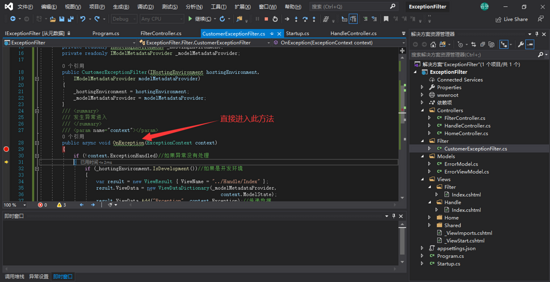
之后会跳到这个视图:../Handle/Index ,会将异常信息传入到此视图
视图页代码:
Message:@ViewData["Exception"]
(可以自行封装。。。)
我们还可以定义成全局的
在Startup类中的ConfigureServices方法中加入这句代码
services.AddControllersWithViews(option => { option.Filters.Add(); }); //3.0以下的版本好像应该这样写:services.AddMvc(); 到此这篇关于.Net Core中使用ExceptionFilter过滤器的方法的文章就介绍到这了,更多相关.Net Core使用ExceptionFilter内容请搜索以前的文章或继续浏览下面的相关文章希望大家以后多多支持!
您可能感兴趣的文章:
相关内容
- ASP.NET Core MVC 中实现中英文切换的示例代码_实用技巧_
- asp.net全局变量的实例方法_实用技巧_
- asp.net core 授权详解_实用技巧_
- Asp.Net Core Identity 隐私数据保护的实现_实用技巧_
- .Net Core3 用Windows 桌面应用开发Asp.Net Core网站_实用技巧_
- asp.net发布后web.config中compilation的debug的值true和false区别点整理_实用技巧_
- 解协议时有符号和无符号整数型处理_实用技巧_
- C# 进制转换的实现(二进制、十六进制、十进制互转)_实用技巧_
- .net Core 使用IHttpClientFactory请求实现_实用技巧_
- .Net获取IP地址的方法_实用技巧_